

k blocks, currently 290).
While prior transaction history is not required to prove the current state is valid (this is handled via a recursive zero-knowledge proof), many applications would like access to this prior transaction history. Examples include block explorers and wallets.
To solve this problem, users may optionally run an archive node that stores a summary of each block seen in a Postgres database. The archive node is just a regular mina daemon that connects to a running archive process.
After seeing 28,500 blocks on mainnet the size as reported by pg_size_pretty( pg_database_size('archiver') ); is 74 MB.
Setting up
Running an archive node is comprised of running the following components:- A mina daemon.
- The archive node package.
- A Postgres node, with a database created with the archive node schema.

Adding redundancy
While the above configuration of a single daemon writing to a single archive node process is the most straightforward, it offers little redundancy if either the daemon or archive process crashes. In those cases, blocks will likely be lost and need to be recovered from other sources (or re-syncing the node if within the lastk blocks).
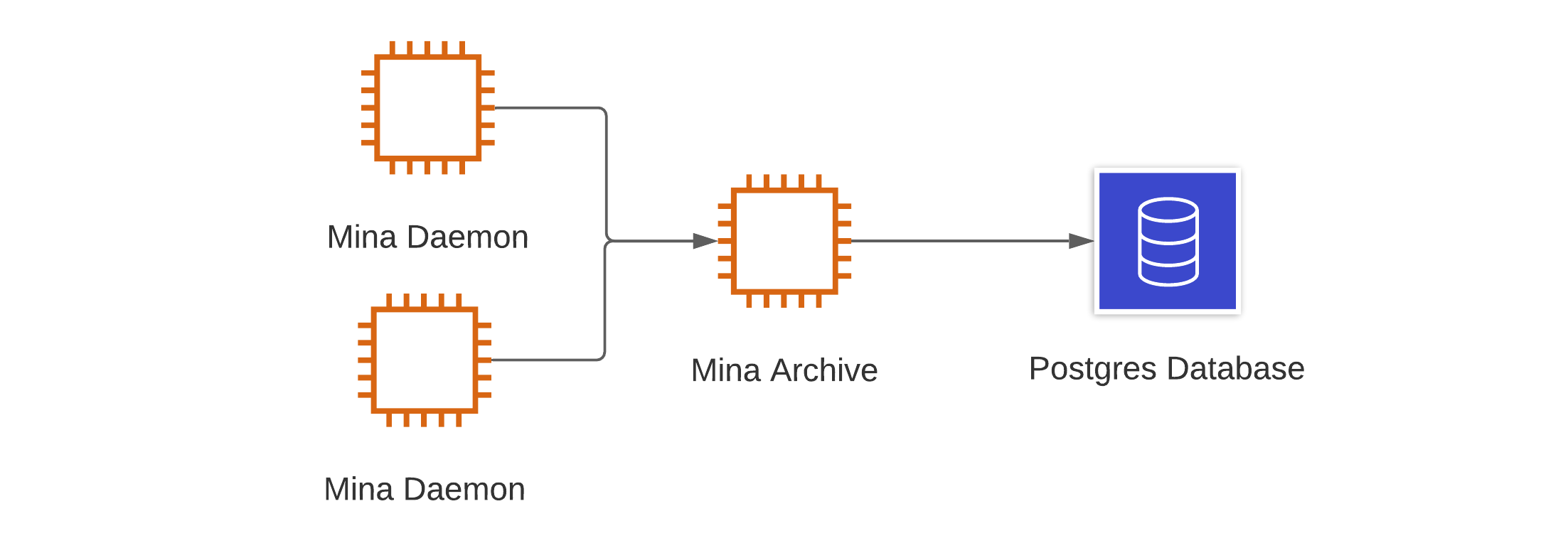
For redundancy, multiple daemons can write to a single archive node process by each specifying the address of an archive process.
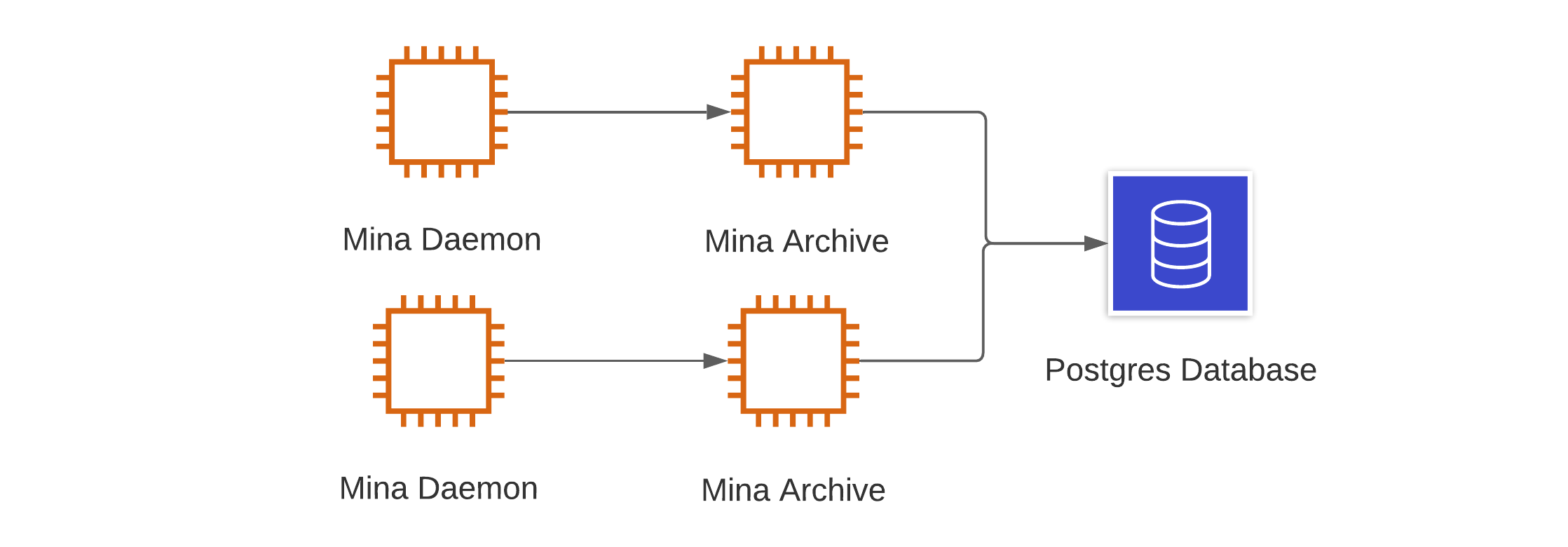
 Further, we can have multiple daemons, pointing to separate archive nodes, both writing to a single Postgres database. Note that in this instance, to ensure consistency of the data, the database should be modified after creating the database and before connecting an archive process to it.
 If running Postgres via a cloud service such as with AWS or GCP, you can further add redundancy with replication and failover by following these best practices.
Alternate storage for block data
In addition to writing the block data to the Postgres database, we can also archive a representation of the block data, known as a precomputed block to either the logs, or upload them to Google Cloud Storage. As a result, a final, fully-redundant setup may look like this:
The precomputed blocks can be huge (as much as 5 MB per block) and much larger than is stored by the archive node. If using log-precomputed-blocks ensure that your logging service can handle such long log lines.
Monitoring
Even with the above setup, likely, you will want to monitor the status of your archive node, and in the case of data loss, be able to restore blocks to the database. The archive node has some available tooling, detailed below, that will identify individual missing blocks, but for a quick overview of the status of the database, the following two queries can be used in conjunction.0 where there are no missing blocks at any height. This query does not, however, confirm that there is a canonical block at each height. As such, this query should be used in conjunction with:
1 for the Genesis block, which does not have a parent. If the two queries return 0 and 1 respectively, you are likely in good shape. If they don’t, you’ll likely need to recover some missing blocks using the archive node tooling.
Archive Tooling
To allow for data restoration, exporting, and verification, the archive node has the following tooling available:- mina-missing-blocks-auditor — reports state hashes of blocks missing from archive database.
- mina-extract-blocks — extracts all blocks or a chain (from a provided start and end hash) from the database.
- mina-archive-blocks — writes blocks to the archive database.
- mina-replayer — replays transactions from the archive node.
mina-missing-blocks-auditor
This tool will identify any parent state hashes missing from the archive database. This tool will only identify the missing parent state hashes for blocks it has stored, i.e., if you are missing a sequential sequence of blocks, it will only return the first. The output from this tool should only return the Genesis block on a complete database, as it has no parent hash. The following output is returned on a database with missing blocks, which allows us to identify the missing blocks, which correspond to theparent_hash.
mina-extract-blocks
To extract blocks from an archive node, for example, for use in recovering missing blocks on a different database, you can use themina-extract-blocks tool to output blocks in an extensional format. This format, as compared to the precomputed blocks, is more lightweight as it only contains the information required to restore data to the archive node.
This tool may export either all the blocks in the database with --all-blocks. Or a chain between a range of state hashes by optionally providing the --start-state-hash or --end-state-hash.
3NKGgTk7en3347KH81yDra876GPAUSoSePrfVKPmwR1KHfMpvJC5.json.
mina-archive-blocks
Themina-archive-blocks tool is used to restore blocks to the database. This tool can be used either with precomputed blocks, i.e. those stored to logs or via Google Cloud Storage or the extensional format as exported by another archive node.
For example, to import the extensional block we exported in the previous section, we could run:
mina-archive-blocks. To do this in a batch, we can make use of standard Linux tooling. For example, the following command will attempt to import all .json files in the current directory. It will also write to separate output files for successful and failed blocks during the process for later review.
--precomputed flag.
mina-replayer
One issue when recovering blocks is that you have to trust the source of the data — for example, downloading a backup you have to trust that the data was not tampered with. Themina-replayer tool takes as input a genesis ledger and can be run on the archive data to produce a ledger corresponding to a protocol state and can be used to verify that the archived data is correct and complete by comparing the resulting ledger to a known one.
Bootstrapping
If you are new to Mina and wish to start an archive node, you will need to get an existing database to bootstrap from (as the node will only restore the last 290 blocks). While you could use the tools listed above to extract and import all blocks, it would be easier to request a database exported using thepg_dumptool (and imported via psql) to bootstrap the archive node from an existing archive database operator. If you need assistance then ask on the project Discord.
If the dump is recent enough, i.e., within the last 290 blocks and you sync a node, it will catchup any missing blocks between the dump and when you started the archive node.